A beautiful starting image can still produce a video that barely moves. That was the main problem with this bathroom film. The useful fix was a more specific camera instruction, followed by a short test before generating the remaining views.
We made the concept images with built-in Image Gen, animated the selected views with local MiniMax H3 in ComfyUI, and assembled the accepted clips in FFmpeg. The final vertical film has five shots and runs for 24 seconds.
An AI-generated design concept made outside Studio. These are separately prepared views and edited clips, not a real property tour, a construction recording or a single generation.
Music: Bossa Nova Study Session by alex-morgan, used under the Pixabay Content License. We used an excerpt with volume adjustment and fades. The source page marks the track as Content ID registered; a license does not guarantee an upload will receive no automated claim.
Start with a finished design you want to keep
The bathroom combines creamy ivory walls, glossy jade-green tile, honey-colored wood, woven cane and aged brass. Small green stone mosaics with cream daisy inlays give the floor its identity. Warm daylight brightens the ivory without turning the whole image green or orange.
The Natural Vintage Bathroom image prompt records that design direction. The approved image used visual-reference guidance and a separate lighting edit. Design reference: 陈姐有点砖 on Rednote. Our example images and video were generated for this case; the reference creator did not make our film.
We settled the finishes before asking for motion. Increasing the floor-tile size weakened the design, so we returned to the small mosaic. Brightening the existing image worked better than rebuilding the room around a different palette.
Plan views, not five versions of the same crop
Our first closer vanity and stool images looked too much like crops of the overview. A tighter crop changes framing but does not reveal a different side of a counter or the top of a stool.
For a genuinely different view, we asked for a new camera position using the approved bathroom as the visual reference. The vanity view looks back from the shower end toward the doorway. The stool view looks obliquely down onto its top and the surrounding mosaic.
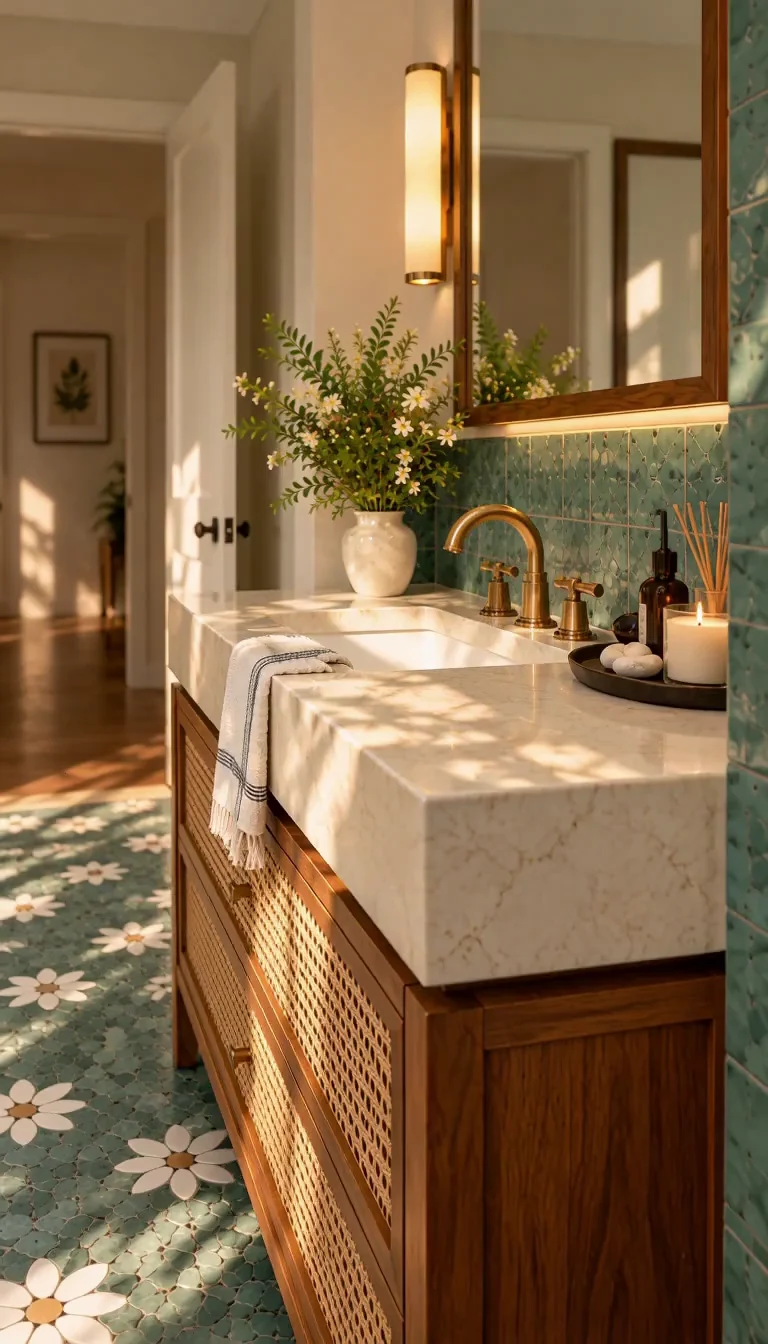
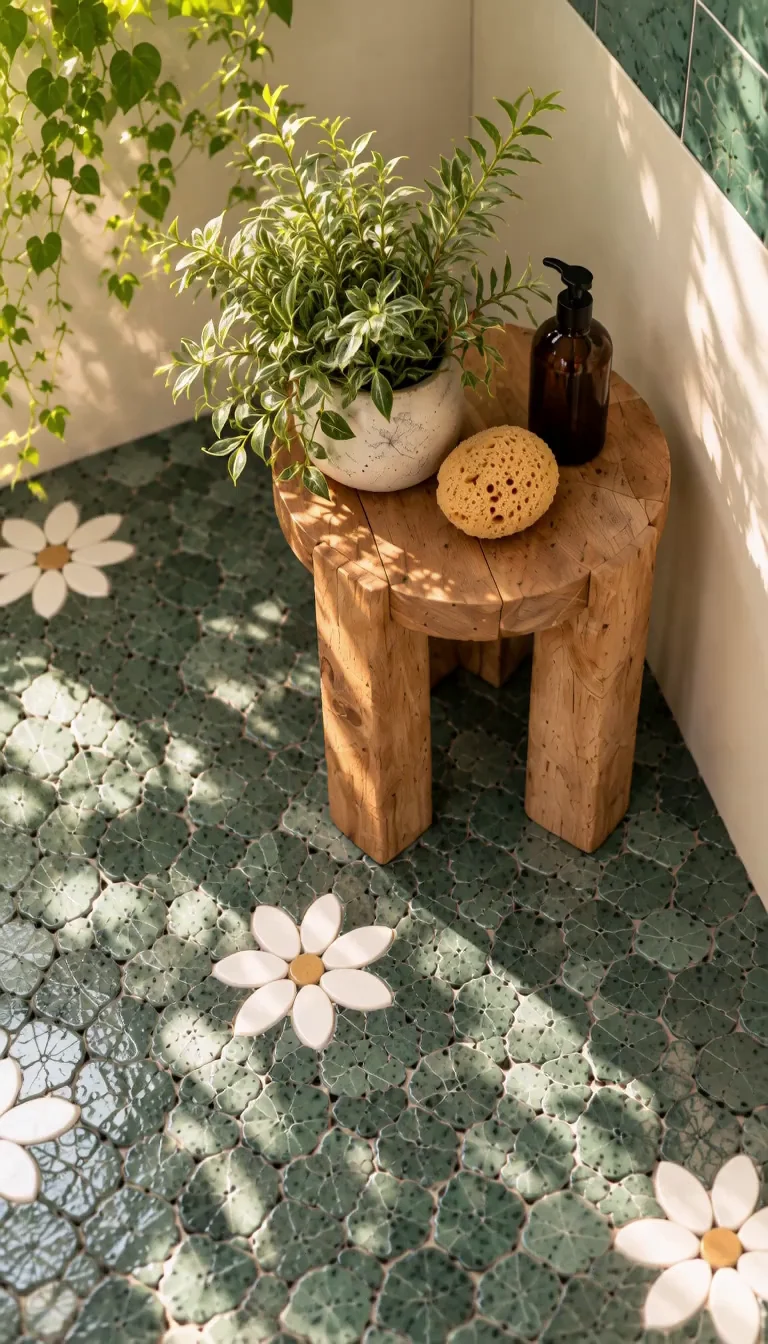
These views coordinate the design, but they are not a measured reconstruction. New viewpoints can invent hidden geometry. For an actual listing or design approval, use photographs or renders from the same verified room model and check openings, fixture positions and dimensions.
Give each five-second clip one camera job
| Shot | Camera job | What we checked |
|---|---|---|
| Overview | Move forward toward the rear window | Window, stool and mosaic remain recognizable |
| Vanity | Push toward the faucet and basin | Near counter edge moves more than the distant doorway |
| Shower | Rise along the tiled wall | Brass fittings stay fixed and tile joints stay straight |
| Stool | Move into the overhead detail | Pot, bottle, sponge and stool retain their arrangement |
| Mosaic | Glide over the floor with a slight upward tilt | Daisy inlays remain readable |
The first vanity instruction emphasized an extremely slight move. The result looked almost static. We replaced vague restraint with an immediate forward dolly, a target in the scene and visible foreground-to-background parallax.
Here is the exact accepted vanity prompt:
A five-second architectural video with a CLEARLY VISIBLE FORWARD DOLLY. Starting immediately, the camera travels smoothly forward about 60 centimeters toward the brass faucet and marble basin over the full five seconds. The faucet and basin grow about 25 percent larger in the frame by the end. The near marble edge passes visibly toward the lower frame edge, while the far doorway shifts more slowly, creating unmistakable depth parallax. One continuous purposeful camera move at normal speed, no pause at the start or end. Keep the camera level with the original viewing direction. Preserve the existing bathroom design, material colors, solid geometry and arrangement of all objects throughout the camera movement. Warm afternoon sunlight, clear architectural detail, no person, no cut or transition. The camera moves; the countertop and fittings remain physically stationary.
The distance and percentage are instructions, not measurements of the result. The accepted clip travels farther than a literal reading would suggest. Judge the movement on screen rather than treating a number in the prompt as a calibrated camera path.
Copy this recorded instruction from the Bathroom Detail Film video prompt, or download the five exact shot prompts and settings. Each shot uses its own starting image. There is no ending-image input in the accepted workflow.
What we changed after failed takes
An early attempt used a slightly cropped ending image as an additional constraint. It produced broken geometry during the clip. We rejected it and returned to first-frame-only generation for this case. That is an observation from this run, not a claim that first-and-last-frame workflows never work.
We also discarded an overview that invented a mirror. A good first frame did not make the entire clip usable. Reviewing several points through each clip, then watching the full movement, caught problems that a thumbnail hid.
The practical sequence became: generate one motion test, review it, then apply the clearer direction to the remaining views. The stool and floor takes already had usable movement, so we kept them. We did not regenerate every shot just to make all the prompts sound identical.
The local ComfyUI settings we actually used
These are reproduction notes from our local run, not a recommended hardware purchase or a Studio configuration guarantee.
| Setting | Recorded value |
|---|---|
| Model checkpoint | minimax_h3_fl2va_pruned_int8_convrot.safetensors |
| Turbo LoRA | minimax_h3_fl2v_turbo_8step_v1.0_comfyui_bf16.safetensors, strength 1 |
| VAE | minimax_h3_video_vae_fp16.safetensors |
| Sampling | 8 steps, res_multistep, simple, denoise 1 |
| Native frame size | 768 × 1344 |
| Generated frames | 124 at 24 fps |
| Frames used per shot | 120, or 5 seconds |
The final three motion takes executed in about 6.0 to 6.5 minutes each. Waiting was longer when another shot was ahead in the queue, and rejected takes added production time. One stool take took 13.1 minutes; our records do not isolate the cause. These are timings from this session, not a general benchmark.
Assemble the film after the movement works
We ordered the clips from the overview to the vanity, shower, stool and mosaic. Each contributes five seconds. Four quarter-second cross-dissolves overlap the shots, making the final duration 24 seconds, rather than 25.
The source video was cropped from 768 × 1344 to 756 × 1344 and scaled to a 1080 × 1920 delivery file. That is an upscaled 9:16 export, not native 1080p generation. Short dissolves soften the changes in viewpoint, but they do not make separately generated spaces geometrically continuous.
We added the selected music after the picture edit. The final version uses the first 24 seconds of the track, reduced by 9.23 dB, with a short entrance and a 1.2-second fade out. Replacing the soundtrack copied the existing video stream without another picture encode.
The delivery file passed full decoding and duration checks. Before publishing, watch the actual platform rendition as well: upload processing can change perceived sharpness, and music checks happen separately from local playback.
Use the workflow for a concept film
Choose a finished design, prepare a small set of purposeful views, test one clearly described camera move, and only then generate the rest. Keep the editing and music stages separate from image-to-video generation.
Our video prompt page prepares one shot with an editable instruction. Availability and parameters depend on the hosted service; opening a template does not automatically generate a montage, add licensed music or reproduce this local ComfyUI run.
For the finishes themselves, start with the bathroom image prompt. For a different interior palette and a slower lighting study, see our sunlit interior film workflow.
- ai-video
- bathroom-design
- image-to-video
- camera-motion
- prompts