The quickest way to compare staging models is to put the same room side by side. Start with the four staging results, then compare two more property-editing prompts below. Every photo opens at full size so you can check the details yourself.
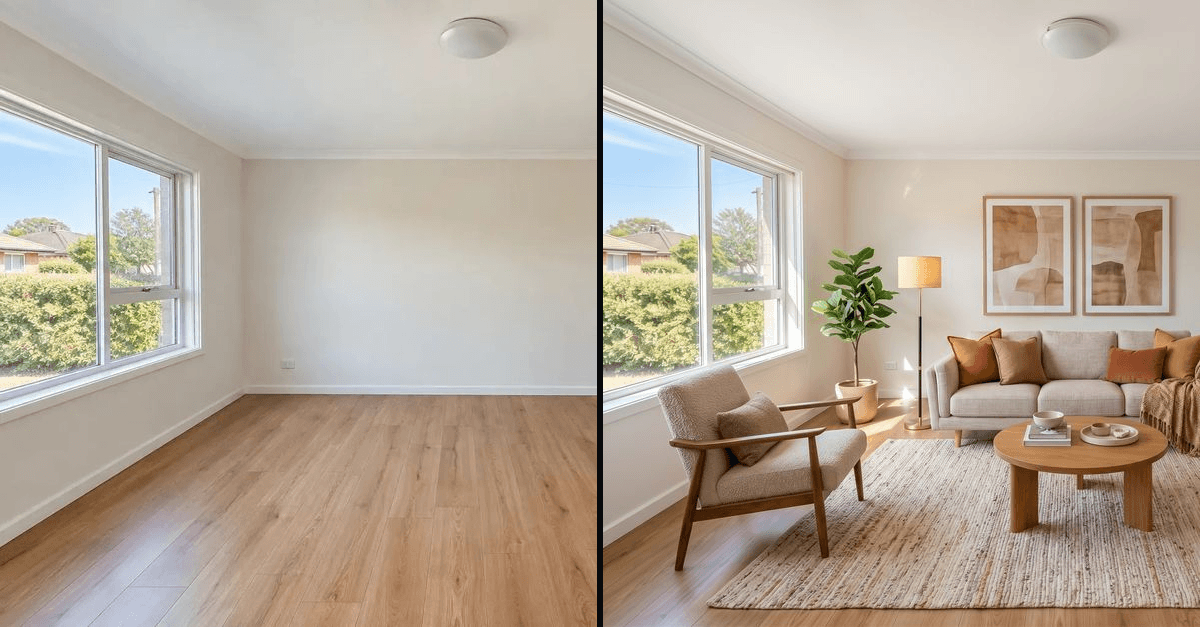
Our pick for this room was GPT Image 2.5 Flare. It produced a balanced layout with the main room features retained. This is a preference from one run, not a general ranking of the models.
1. Stage a room · 2. Edit a countertop · 3. Add a sign · Arena scores
1. Stage an empty living room
September 29, 2026 (UTC). One output per model. This group uses the original Nano Banana 2, not 2.1. See the newer Nano Banana 2.1 tests.
View the original room
Prompt
Stage this empty living room in warm modern for a listing.

Balanced seating area. Window, doorway and ceiling light closely match the source.
A fuller arrangement. Main room features stay aligned, but the extra pieces make it busier.

The fastest request and the smallest output. A sparser layout, with a small rug and scattered pieces.

Inviting styling, but adds a curtain and an outlet on the right of the back wall. Check fixed details.
Select any photo to zoom in and inspect the details.
What stands out: Flare is the most balanced to our eyes. Sunburst is an option if you want more furniture. Nano Banana 2 is less cohesive here, though you may prefer its lighter furnishing. Grok's added outlet shows why an attractive result still needs comparison with the source. The original left-hand outlet becomes hidden behind furniture, so we cannot confirm its preservation.
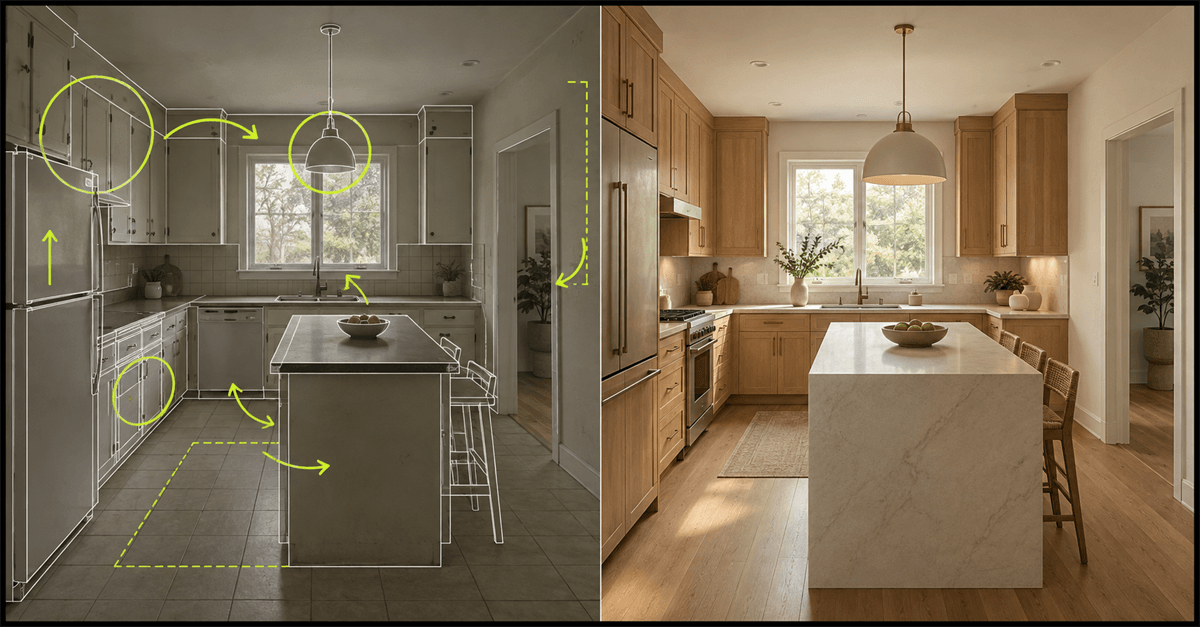
2. Change only one countertop section
October 7, 2026. The next two grids use the original plus Nano Banana 2.1, Pro and Sunburst, once each. For this kitchen, all three received the same photo and a marked-up copy identifying the back countertop along the sink wall.
Prompt
Change the marked benchtop section to honed white marble. Leave the side benchtops, cabinets, sink, tap, tiles and everything else exactly as they are.
Compare the back countertop with both side sections. Only the back section was marked.
Changes the back section. Both side countertops visibly retain their granite finish.
Carries the marble onto the right-hand section beside the stove, beyond the requested area.
Changes the back section while the visible side countertops remain granite.
Select any photo to zoom in and inspect the details.
What stands out: Nano Banana 2.1 and Sunburst follow the requested boundary more closely in these samples. Pro changes an extra section. We used the marked-photo version of Sunburst for this comparison; the separate native-mask experiment is shown in the full Nano Banana 2.1 test.
3. Add a sign without changing the property
The same exterior photo goes to all three models. Here, readable text is only part of the task: the lawn, planting and house are supposed to stay as photographed.
Prompt summary
Add a real estate sign in the lawn reading "JUST LISTED" and "3 BED · 2 BATH". Keep the house, lawn and driveway as they are.
The lawn has visible dry patches. Existing shrubs and planting provide a reference.
Correct sign text, but makes the lawn bright green and adds planting.
Correct text. The visible lawn and garden stay closest to the source in this group.
Correct text, with extra flowers around the existing planting. Check beyond the sign.
Select any photo to zoom in and inspect the details.
What stands out: all three get the wording right. Pro is our preference for preserving this scene. Nano Banana 2.1 makes the most obvious unrequested changes, despite following the kitchen edit closely. A model that handles one prompt well can still miss another.
How to read these comparisons
The first group uses a 1536 × 1024 photo. A script sent the same photo and brief through the studio's routing, prompt assembly and image-provider code. Each model received the same expanded prompt to preserve architecture, flooring, fixtures, camera angle and lighting direction, while adding furniture and leaving walking paths clear. We made no model-specific prompt rewrites or retries in that group.
The kitchen and sign groups reuse the existing October 7 tests, with one result per model per task and the same inputs within each group. The sign brief above is a summary of the instruction recorded in the original test article. These additional tasks test editing behavior; they are not extra virtual-staging trials. The kitchen result represents a proposed renovation, not the property's current condition. We did not generate new images for this layout update.
Grok, Flare and the original Nano Banana 2 were not tested on the kitchen or sign prompts. The model lineup changes after the staging group, so these grids do not rank all six models against each other.
These are individual outputs and request times, not success rates or average speeds. Output dimensions differ, so this is not an equal-resolution speed benchmark. Another room or run can produce a different result. Parts of the room hidden by new furniture remain unverified.
The October 7 Astravisualize catalog lists Grok Imagine at 9 credits, and GPT Image 2.5 Flare and Sunburst at 19 credits each for these standard-size edits. Check the studio's quote before generating; see plans and credits for current access.
The newer Arena rankings
Arena's original post places the newer Nano Banana 2.1 fourth in Multi-Image Edit, with 1,431 points. Here are the published scores for the model families discussed in our comparisons. These results use different inputs and newer variants than our September 29 room test, so they add context rather than replace it. See our Nano Banana 2.1 tests for the newer model on property photos.
Scroll sideways to compare all three leaderboards.
| Model / variant | Image Edit | Multi-Image Edit | Text-to-Image |
|---|---|---|---|
| GPT Image 2.5 Sunburst | 1,524 | 1,527 | 1,425 |
| GPT Image 2.5 Flare | 1,481 | 1,476 | 1,398 |
| Nano Banana 2.1 | 1,428 | 1,431 | 1,328 |
| Nano Banana 2 | 1,387 | 1,370 | 1,261 |
| Nano Banana Pro | 1,386 | 1,367 | Not shown |
| Nano Banana Pro 2K | 1,390 | 1,364 | Not shown |
| Grok Imagine Image 2.0 (canvas) | 1,439 | Not shown | 1,321 |
| Grok Imagine Image 2.0 (low) | 1,425 | Not shown | 1,297 |
| Grok Imagine Image Quality | 1,391 | Not shown | Not shown |
Source: the three charts in Arena's original post. Compare scores within the same column. These measure human preference, not staging accuracy, and are a dated snapshot rather than live rankings.
Not shown means the variant is absent from the published chart. Pro and Pro 2K are separate entries. Arena's named Grok variants are not a confirmed match for the Grok endpoint in our room tests.
Select any of the original charts below to zoom in here without leaving the article.

Nano Banana 2.1 by @Google has landed in the Text-to-Image Arena, Image Edit Arena and Multi-Image Edit Arena! It landed: - #4 in Multi-Image Edit with 1431 pts - #5 in Text-to-Image with 1328 pts - #6 in Image Edit with 1428 pts This release is a substantial improvement from Show more
Multi-Image Edit
Text-to-Image
Image Edit

Meet Nano Banana 2.1, our latest image generation and editing model 🍌 This upgraded version outperforms our previous models across the board, with notable leaps in visual design, mask-based editing, and subject consistency to help you create more natural-looking images.
What to check before publishing a staged photo
Use the original photo as your reference, even when the result looks convincing:
- Openings and room shape: compare window divisions, door edges, wall corners, ceiling height and camera perspective.
- Fixed details: check outlets, switches, trim, radiators and built-ins. Treat anything hidden behind new furniture as unverified.
- Materials and condition: confirm flooring, wall finishes and visible wear have not been silently replaced or concealed.
- Furniture and light: inspect scale, walking paths, contact with the floor and shadow direction.
- Presentation: retain the original and clearly identify the edited image as virtually staged. Check the requirements that apply to your listing; our FAQ is a starting point.
If a fixed feature changes, reject that output or revise it and compare again. A model name or a well-written prompt is not a substitute for checking the image.
Try the same comparison on your room
Start with a clear photo of an empty room and one specific style. Keep the photo and brief unchanged when comparing models, then check each result against the original before choosing a favorite.
The first five renders use the standard model and are free with a watermark. Testing the GPT Image models requires a paid plan; plans start at $15 a month. The studio shows the selected model's credit quote before you generate.
Try virtual staging on your photo, or compare plans and model access.
Updated October 7, 2026: arranged the original September 29 staging outputs side by side and added two existing October 7 editing tests with their own model lineup. Earlier Grok window and doorway claims were corrected after image review. No new generations were made for this update.
- virtual-staging
- image-models
- gpt-image-2-5
- nano-banana
- grok-imagine